MP RERA: Madhya Pradesh Real Estate Regulatory Authority – A Complete Guide
Anurag Sodani • June 11, 2026

TL;DR: MP RERA — the Madhya Pradesh Real Estate Regulatory Authority — is the state body that regulates real estate projects and agents in Madhya Pradesh under the RERA Act, 2016. Headquartered in Bhopal, it covers key cities like Indore, Gwalior, Jabalpur, and Ujjain. The official website is mprera.gov.in.
Madhya Pradesh has one of India’s fastest-growing real estate markets outside the metro cities. Indore, consistently ranked India’s cleanest city, has seen a surge in residential development. Bhopal’s government-driven infrastructure expansion is attracting new housing projects. And smaller cities like Jabalpur and Ujjain are seeing first-generation home buyers entering the market in large numbers.
For all of them, MP RERA is the safeguard. It ensures that the project they invest in is legally registered, financially sound, and bound by timelines. This guide explains everything you need to know about MP RERA — from registration to complaint filing.
What is RERA?
RERA — the Real Estate (Regulation and Development) Act, 2016 — is a Parliament of India legislation that established a unified framework for regulating real estate transactions across the country. It applies to both residential and commercial real estate projects.
The central RERA Act mandates that every developer register their project with the state authority before advertising, selling, or accepting bookings. Developers must deposit 70% of project funds in a designated escrow account and provide quarterly construction updates to the authority. Buyers receive statutory rights including compensation for delays, standardised carpet area measurement, and the right to complete project disclosures before booking.
Each Indian state implements RERA through its own authority. In Madhya Pradesh, this is MP RERA.
What is MP RERA?
MP RERA is the Real Estate Regulatory Authority of Madhya Pradesh, established under the RERA Act, 2016 by the Government of Madhya Pradesh. The authority is headquartered at RERA Bhawan in the Arera Hills area of Bhopal, which houses MP’s major government offices.
MP RERA registers real estate projects and agents, provides a public database of registered projects, and resolves buyer-developer disputes through a structured adjudication process. Its online portal allows buyers in any city — from Indore’s Vijay Nagar to Bhopal’s Arera Colony to Jabalpur’s Napier Town — to verify a project’s legal status before investing.
Madhya Pradesh notified its RERA rules on May 1, 2017. Since then, MP RERA has built a growing database of registered projects and a track record of complaint resolution, though the state authority is known to be stricter about documentation completeness than some peer states.
Importance of MP RERA
Madhya Pradesh’s real estate sector includes both large developers operating in Indore and Bhopal, and hundreds of smaller regional builders in towns across the state. For the second category especially, RERA compliance is a significant accountability upgrade.
- Buyers in tier-2 cities like Ujjain and Rewa can now verify a project’s registration status and financial disclosures — something previously available only to sophisticated buyers in metros.
- MP RERA has standardised carpet area definition, eliminating the common practice of charging buyers for common areas, parking, and construction wastage.
- Home buyers taking a home loan in Madhya Pradesh benefit from cleaner project documentation, which speeds up bank due diligence and loan disbursement.
- Developers who comply with MP RERA are eligible for better institutional financing, creating a healthy incentive for formal compliance.
MP RERA Rules and Regulations
Madhya Pradesh notified the Madhya Pradesh Real Estate (Regulation and Development) Rules, 2017. Key provisions relevant to buyers and developers include:
- Mandatory escrow account: 70% of money collected from allottees must be deposited and used exclusively for land and construction costs of that specific project.
- Quarterly updates: Developers must submit quarterly project progress reports to MP RERA — including construction photos, financial position, and unit booking status.
- No advance beyond 10%: Developers cannot collect more than 10% of the apartment cost before a written agreement to sell is executed.
- Timeline declarations: Developers must state the project completion date at registration. Any extension must be applied for formally, citing valid reasons such as government approval delays or force majeure.
- Agent obligations: Real estate agents must register with MP RERA and facilitate only RERA-registered projects.
MP RERA Website and Contact Details
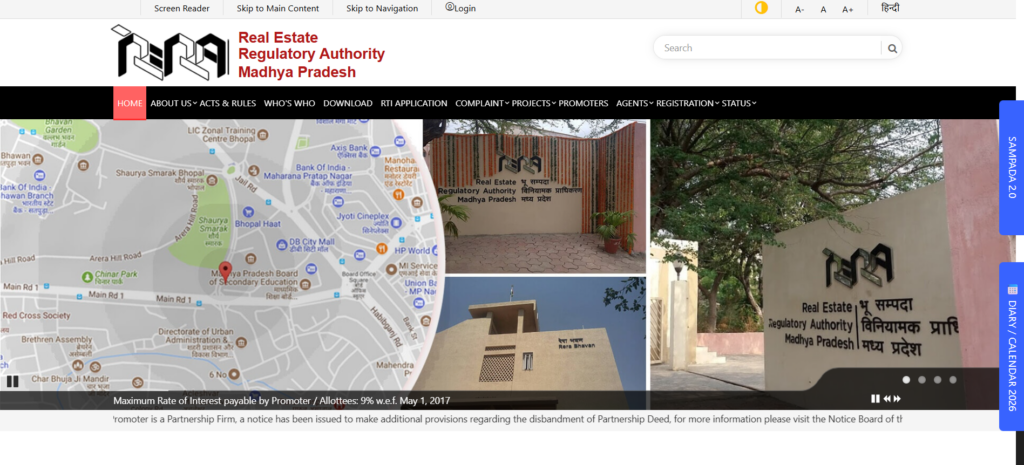
The official MP RERA website is https://www.mprera.gov.in/. All project registrations, agent listings, complaint filings, and quarterly updates are managed through this portal.
Head Office Address:
Real Estate Regulatory Authority Madhya Pradesh, RERA Bhawan, Arera Hills, Main Road No. 1, Bhopal – 462011
Phone: 0755-2556760, 0755-2557955
Email: secretaryrera@mp.gov.in
Who Needs to Register Under MP RERA?
All promoters and developers who intend to sell, advertise, or market any real estate project in Madhya Pradesh must register if the project involves a land area above 500 square metres or more than 8 apartments. This includes both new launches and ongoing projects that were incomplete when RERA came into force.
Real estate agents facilitating transactions in Madhya Pradesh must also register. Individual agents and firms both require separate registrations.
Buyers and complainants do not need to register to search the portal or to file complaints, though creating a citizen login simplifies the process.
How to Do MP RERA Login
- Go to https://www.mprera.gov.in/ and click the Login/Registration button.
- For existing users: enter your User ID and password.
- For new registrations: click “New User” and select your category — Promoter, Agent, or Citizen.
- Complete email and mobile OTP verification.
- Your dashboard shows active projects, pending filings, compliance alerts, and complaint status.
MP RERA Project Search
- Visit the official MP RERA portal and click “Search Projects” or “Registered Projects”.
- Filter by city — Indore, Bhopal, Gwalior, Jabalpur, Ujjain — or enter project name or registration number.
- Each project entry shows registration number, promoter details, project type, expected completion date, and quarterly updates.
- Verify the escrow account status and booking figures before making any payment to the developer.
Step-by-Step Guide for Promoter Registration
- Go to the MP RERA portal and click “New Registration” → “Promoter”.
- Enter entity type (individual/company/partnership) and email ID. Verify with OTP.
- Fill in project details: name, site address, land area, number of units, type (residential/commercial/mixed).
- Upload title documents, approved building plan, environmental clearance, financial statements, and promoter PAN.
- Declare expected project completion date and quarterly milestone schedule.
- Pay the registration fee applicable to the project category and area.
- Submit the application. MP RERA reviews documentation and issues the registration number upon approval.
Step by Step Guide for Real Estate Agent Registration
- On the MP RERA portal, select “New Registration” → “Real Estate Agent”.
- Enter personal details: name, PAN, Aadhaar, address, and contact information.
- Upload ID proof, address proof, and recent photographs.
- Pay the agent registration fee.
- Receive your MP RERA agent registration number upon successful verification.
Step-by-Step Guide for Complainant Registration
- Visit the MP RERA portal and navigate to the Complaints section.
- Click “File a Complaint” and log in or register as a citizen.
- Enter the project RERA registration number you are filing against.
- Describe the grievance: possession delay, quality defect, booking amount not refunded, or misleading advertisement.
- Attach supporting documents and pay the complaint fee online.
- Your complaint number is generated. MP RERA schedules a hearing and notifies both parties.
How to Check MP RERA Registration Status
- Go to mprera.gov.in and select “Application Status”.
- Enter your application number or registration number.
- The status indicates whether the application is Under Scrutiny, Approved, or Requires Additional Documents.
- For project status checks as a buyer, search the “Registered Projects” database using the project name.
Benefits of MP RERA
- Project disclosures are publicly available — buyers in smaller MP cities now have access to the same level of information as metro buyers.
- Escrow account protection ensures your money is used for your flat, not for the developer’s other projects or liabilities.
- Quarterly updates hold developers accountable for construction progress — delays become visible and legally actionable.
- For home buyers using a home loan, MP RERA compliance simplifies legal verification by lenders, often reducing loan processing time.
- Transparent pricing through standardised carpet area ensures you pay only for the space you actually get.
Difference Between RERA and MP RERA
RERA is the central act applicable to all states. MP RERA is Madhya Pradesh’s implementation of the central act through a dedicated state authority. MP RERA has framed state-specific rules, schedules complaint hearings, and issues orders within its jurisdiction. The central RERA Act sets the national minimum standards; MP RERA’s rules and orders fill the operational details for the state’s real estate landscape.
Frequently Asked Questions
How to check project details on the MP RERA website?
Visit mprera.gov.in, go to “Registered Projects”, and search by city (Indore, Bhopal, Gwalior, etc.), project name, or registration number. Each listing shows promoter credentials, approvals, timeline, and quarterly updates.
What is the meaning of the RERA number?
The RERA registration number is a unique identifier assigned by MP RERA to each registered project. It confirms that a project has met the regulatory requirements. Buyers should always verify this number before paying a booking amount.
What is MP RERA?
MP RERA is the Madhya Pradesh Real Estate Regulatory Authority. It is the state body implementing the RERA Act, 2016 in Madhya Pradesh. It registers projects and agents, provides a public project database, and resolves buyer-developer disputes.
How to get RERA registration in Madhya Pradesh?
Visit mprera.gov.in, register as a Promoter, fill in project and land details, upload required documents, pay the registration fee, and submit. MP RERA reviews the application and issues the registration number.
What is the RERA Act in Madhya Pradesh?
The RERA Act in Madhya Pradesh is the central Real Estate (Regulation and Development) Act, 2016, implemented through MP RERA under the Madhya Pradesh Real Estate (Regulation and Development) Rules, 2017.
Did MP RERA complaints get addressed?
MP RERA conducts regular hearings and issues binding orders. However, the speed of resolution varies based on the complexity of the case and the developer’s compliance. Buyers can track complaint status online through the portal.
Conclusion
Whether you are buying your first home in Indore’s growing residential corridors or investing in a Bhopal township, MP RERA ensures your rights are protected. Always verify the RERA registration number before booking. Use the Home First Finance Home Loan EMI Calculator and check home loan eligibility before committing to a purchase.