How to Apply For PMAY-2.0 Online: Complete Step-by-Step Guide (2026)
Anurag Sodani • December 27, 2024
PMAY-U 2.0 allows eligible urban households to apply online for housing assistance and home loan interest subsidy under the Pradhan Mantri Awas Yojana Urban 2.0 scheme. To apply for PMAY 2.0 online, applicants must first verify their eligibility, keep Aadhaar and other required documents ready, register on the official PMAY-U portal, complete the online application form, upload supporting documents, and submit the application to receive an Application ID for future tracking.
This guide explains the complete PMAY 2.0 online application process, including eligibility criteria for EWS, LIG, and other income categories, documents required, subsidy benefits available on home loans, login and status-check procedures, application deadlines, and common mistakes to avoid. Whether you are applying for a new home purchase, construction, or seeking PMAY-linked home loan subsidy, this article covers every step required to successfully apply for PMAY-U 2.0 online.
What is PMAY-U 2.0?
PMAY Full Form
PMAY stands for Pradhan Mantri Awas Yojana. The “U” in PMAY-U stands for Urban. It is a flagship housing scheme of the Government of India that provides financial assistance to eligible households for constructing or purchasing a pucca house.
PMAY 2.0 vs PMAY 1.0
PMAY 1.0 was launched in 2015 with a mission to provide housing for all urban households by 2022. PMAY-U 2.0 is the continuation and expansion of that mission, launched to address the remaining urban housing demand. The key differences are:
| Feature | PMAY 1.0 | PMAY-U 2.0 |
|---|---|---|
| Launch Year | 2015 | 2024 |
| Target Beneficiaries | 1.18 crore households | 1 crore additional households |
| Subsidy Model | Credit Linked Subsidy (CLSS) | Interest subsidy via home loan |
| Implementation Period | 2015–2022 (extended to 2024) | 2024–2029 |
| Focus | EWS, LIG, MIG | EWS and LIG primary focus |
Key Features of PMAY-U 2.0
PMAY-U 2.0 operates through four verticals: Beneficiary Led Construction (BLC), Affordable Housing in Partnership (AHP), In-Situ Slum Rehabilitation (ISSR), and Interest Subsidy Scheme (ISS). The Interest Subsidy Scheme is the most relevant vertical for home loan borrowers, as it directly reduces your EMI by crediting the subsidy upfront to your loan account.
PMAY 2.0 Subsidy Benefits
Under the Interest Subsidy Scheme (ISS) of PMAY-U 2.0, eligible EWS and LIG beneficiaries can receive an interest subsidy of 4% per annum on a home loan amount of up to ₹8 lakh for a maximum tenure of 20 years. Unlike a cashback or reimbursement, the subsidy is calculated as a net present value (NPV) and credited directly to your home loan account by the lender, reducing your outstanding principal from the beginning of the loan tenure.
For eligible applicants, the subsidy benefit can amount to approximately ₹1.80 lakh, depending on the loan amount, tenure, and applicable scheme conditions. Since the subsidy is adjusted against the principal balance, borrowers benefit through a lower EMI, reduced interest outgo, or a shorter loan tenure. This makes PMAY-U 2.0 one of the most valuable homeownership support schemes available to first-time homebuyers in eligible income categories.
How to Apply for PMAY 2.0 Online
Applying for PMAY-U 2.0 online is a straightforward process if you keep your Aadhaar-linked mobile number, income documents, property details, and home loan information (if applicable) ready beforehand. Follow these steps to complete your application successfully.
Step 1: Visit the Official PMAY-U 2.0 Portal
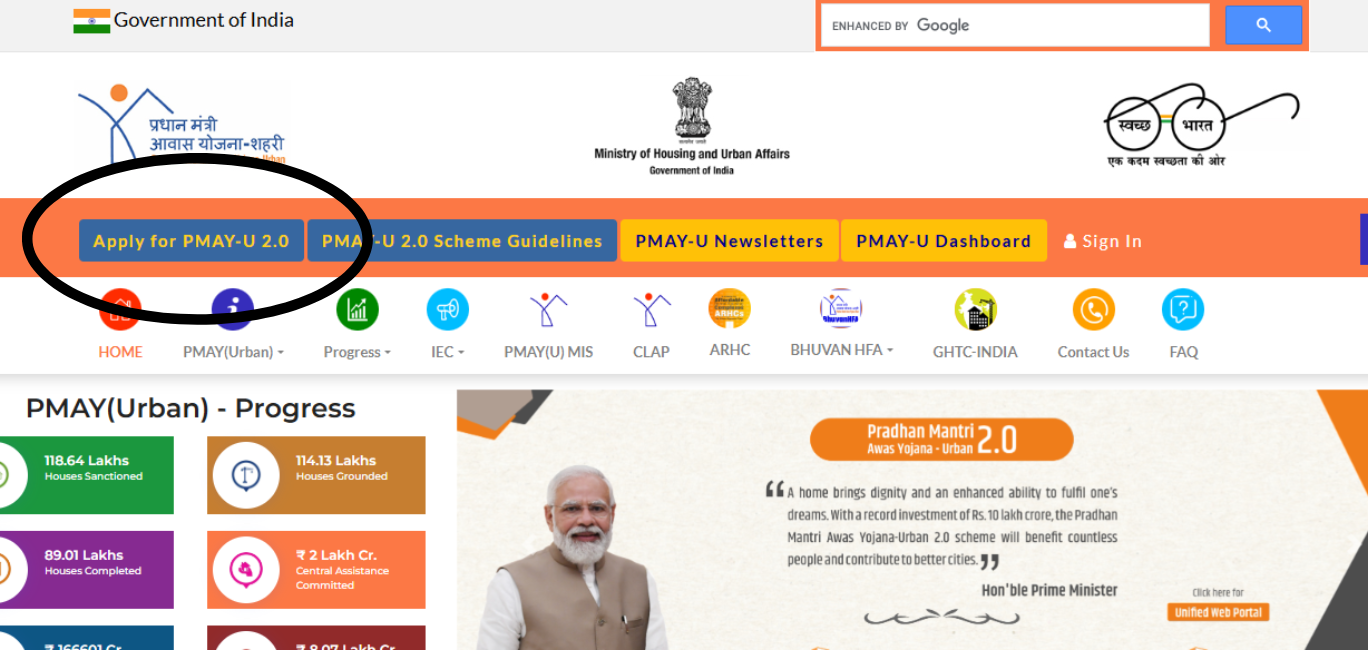
Go to the official PMAY-U website pmay-urban.gov.in and select the option to apply for PMAY-U 2.0. Before proceeding, review the scheme guidelines, eligibility criteria, and instructions provided on the portal to understand the application requirements.
Step 2: Review Instructions and Required Documents
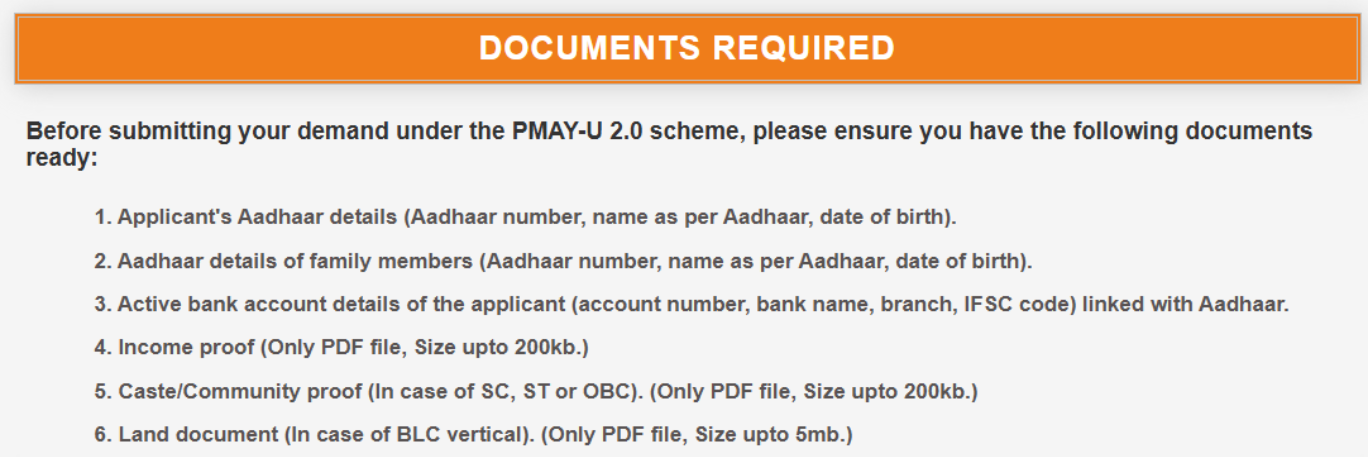
Carefully read the application instructions displayed on the portal. Check the list of required documents and ensure you have all necessary identity, address, income, property, and home loan documents available in the prescribed format before proceeding.
Step 3: Complete the Eligibility Check
Enter the required preliminary details, including the state where the property is located and other basic information. The system will perform an eligibility check based on the information provided. Once confirmed, proceed to the next step.
Step 4: Register and Verify Your Aadhaar
Register using your Aadhaar-linked mobile number. Enter your 12-digit Aadhaar number and provide consent for Aadhaar authentication. An OTP will be sent to your registered mobile number for verification. Ensure that your name and details match exactly with your Aadhaar records.
Step 5: Fill in the PMAY-U 2.0 Application Form
After successful authentication, complete the beneficiary application form by entering your personal details, family information, household income, address, property details, and home loan information (if applicable). The primary applicant should carefully verify all details before proceeding.
Step 6: Upload Supporting Documents
Upload scanned copies of all required documents, including identity proof, address proof, income proof, property documents, and home loan documents. Ensure that all files are clear, complete, and meet the prescribed size and format requirements.
Step 7: Review and Submit the Application
Before final submission, review all information entered in the application form. Check for spelling errors, Aadhaar mismatches, incorrect income details, or missing documents. Once satisfied, submit the application.
Step 8: Save the Application ID and Track Status
After successful submission, an Application ID and acknowledgement will be generated and sent to your registered mobile number. Save this Application ID carefully, as it will be required to track your PMAY-U 2.0 application status and subsidy processing progress in the future.
How to Fill PMAY 2.0 Application Form Correctly
Personal Details
Ensure your name is spelled exactly as it appears on your Aadhaar card. Enter your date of birth, gender, and contact information accurately.
Income Details
Your annual household income must include the income of all earning members in the family. Do not underreport income to qualify for a lower category, as this can lead to rejection or recovery of subsidy later.
Family Details
List all family members who will be co-owners or residents. If you are adding a female co-owner to meet the ownership requirement, ensure her Aadhaar is also available for the application.
Property Details
Enter the complete address of the property as it appears in the sale agreement or allotment letter. Include the RERA registration number of the project where applicable.
Common Mistakes
The most common mistakes include a name mismatch between Aadhaar and the application form, income underreporting, missing documents, applying under the wrong category, and not linking the application to the correct home loan account. Double-check all details before final submission.
How to Check PMAY 2.0 Application Status Online
Status Check Using Application ID
Visit pmay-urban.gov.in, go to “Citizen Assessment,” and select “Track Your Assessment Status.” Enter your Application ID and mobile number to view the current status.
Status Check Using Aadhaar Number
On the same status check page, you can also use your Aadhaar number and registered mobile OTP to retrieve your application status if you do not have your Application ID handy.
What Different Status Messages Mean
“Submitted” means your application has been received and is under initial review. “Under Verification” means the Urban Local Body or State Nodal Agency is verifying your details. “Approved” means your application has been cleared for subsidy processing. “Rejected” means your application did not meet eligibility criteria, and you will typically receive a reason via SMS or on the portal.
PMAY 2.0 Login Process
Applicant Login
Go to pmay-urban.gov.in and click “Citizen Assessment” or the login option. Enter your registered mobile number and the OTP sent to it to access your application dashboard.
Forgot Password
PMAY-U 2.0 uses OTP-based login linked to your Aadhaar-registered mobile number. If you are unable to log in, ensure you are using the mobile number linked to your Aadhaar. If your number has changed, you may need to visit your nearest Urban Local Body office for assistance.
Login Issues
If the OTP is not received, check your network and try again after a few minutes. If the portal shows an error on your Aadhaar number, verify that the number entered matches exactly as it appears on your Aadhaar card, including any middle name or initials.
PMAY 2.0 Last Date for Application
Current Application Deadline
PMAY-U 2.0 is currently operational with a mission period running through 2029. As of 2026, applications are open. However, specific scheme components and subsidy windows may have individual deadlines. Always check the official portal for the latest notified last date.
Extension Updates
The government has historically extended PMAY deadlines in response to demand. Any extensions are notified on the PMAY-U portal and through Ministry of Housing and Urban Affairs circulars. Subscribe to portal notifications to stay updated.
What Happens After the Last Date
Applications submitted before the notified deadline are processed even after the date passes, as long as all documents are complete and verification is successful. Applications not submitted by the deadline are generally not considered for that particular subsidy window.
How to Get PMAY 2.0 Subsidy on a Home Loan
Home Loan Requirement
To avail of the Interest Subsidy Scheme under PMAY-U 2.0, you must take a home loan from a scheduled bank, housing finance company, or microfinance institution registered with the National Housing Bank. HomeFirst India is an NHB-registered housing finance company through which you can apply for a home loan and simultaneously link it to your PMAY-U 2.0 subsidy claim.
Subsidy Calculation
For EWS and LIG beneficiaries, the interest subsidy is 4% per annum on a loan of up to ₹8 lakh for up to 20 years. The net present value of this subsidy — calculated at a discount rate of 9% — is credited directly to your loan account upfront. On an ₹8 lakh loan at 4% subsidy for 20 years, the NPV credit can amount to approximately ₹1.80 lakh to ₹2.20 lakh, reducing your effective EMI significantly from day one.
How Banks Process PMAY Subsidy
Your lender submits your claim to the Central Nodal Agency (NHB or HUDCO) after verifying your PMAY eligibility. Once approved, the subsidy amount is credited directly to your loan account, reducing your outstanding principal. Your EMI is then recalculated on the reduced principal, or your loan tenure is shortened depending on the arrangement with your lender. Check your home loan eligibility to understand your borrowing capacity before applying.
PMAY 2.0 Eligibility Criteria
EWS Eligibility
Households with an annual income of up to ₹3 lakh fall under the Economically Weaker Section (EWS) category. The applicant must not own a pucca house anywhere in India, and no family member should have previously benefited from any central government housing scheme.
LIG Eligibility
Households with an annual income between ₹3 lakh and ₹6 lakh fall under the Lower Income Group (LIG) category. The same conditions apply — no existing pucca house anywhere in India and no prior benefit from a central government housing scheme.
MIG Eligibility
The Middle Income Group (MIG) category covers households with incomes between ₹6 lakh and ₹18 lakh annually. Note that the Interest Subsidy Scheme under PMAY-U 2.0 currently focuses on EWS and LIG categories. MIG applicants should verify the latest applicable benefits on the official PMAY-U portal before applying.
MIG-I vs MIG-II
| Category | Annual Income | Subsidy on Loan Up to |
|---|---|---|
| MIG-I | ₹6 lakh to ₹12 lakh | ₹9 lakh (under PMAY 1.0 CLSS) |
| MIG-II | ₹12 lakh to ₹18 lakh | ₹12 lakh (under PMAY 1.0 CLSS) |
For PMAY-U 2.0’s Interest Subsidy Scheme, confirm current MIG applicability directly on the PMAY-U portal.
Income Documents Required
Income proof is one of the most important parts of the PMAY application. Accepted documents include salary slips for the last three months, Form 16 or Income Tax Returns for the last two years, bank statements for the last six months, and for self-employed applicants, audited financial statements or a certificate from a Chartered Accountant.
Who Cannot Apply
You cannot apply for PMAY-U 2.0 if you or any member of your family owns a pucca house anywhere in India, has previously availed of a central government housing subsidy, earns more than the prescribed income limit for your category, or plans to purchase a property outside an urban area notified under PMAY-U.
Documents Required for PMAY 2.0 Application
Identity Proof
You must submit your Aadhaar card as the primary identity document for a PMAY-U 2.0 application. You can also provide your PAN card, Voter ID, or Passport as supporting identity proof.
Address Proof
You can submit your Aadhaar card (if it shows your current address), Voter ID, Passport, utility bills (electricity or water bills issued within the last three months), or a bank passbook displaying your current address as address proof.
Income Proof
Salaried applicants need salary slips for the last three months and Form 16 or ITR for the last two financial years. Self-employed applicants need ITR for the last two years and audited business financials or a CA certificate.
Property Documents
You must provide the sale agreement or allotment letter from the builder or authority, property title documents, and an approved building plan (for construction cases).
Home Loan Documents
To process the subsidy, you must provide the sanction letter from the lending institution, your loan account number, and the IFSC code of the lending bank or housing finance company.
Self-Employed Applicant Documents
In addition to the income documents above, self-employed applicants may be asked to provide a business registration certificate, GST registration (if applicable), and bank statements for the last twelve months showing business transactions.
PMAY-U 2.0 vs PMAY-G: Which Scheme Should You Apply For?
If you have been searching for PMAY Gramin apply online, it is important to know that PMAY-U and PMAY-G are two separate schemes with different portals and eligibility conditions.
| Feature | PMAY-U 2.0 | PMAY-G |
|---|---|---|
| Area Covered | Urban (cities, towns, notified areas) | Rural (villages, gram panchayats) |
| Administered by | Ministry of Housing & Urban Affairs | Ministry of Rural Development |
| Application Portal | pmay-urban.gov.in | pmayg.nic.in |
| Primary Eligibility | Urban households without pucca house | Rural households without pucca house |
| Subsidy Type | Interest subsidy on home loan | Direct financial assistance for construction |
If your property is in a village or rural gram panchayat area, you should apply under PMAY-G at pmayg.nic.in. If it is in a city, town, or notified urban area, apply under PMAY-U 2.0 at pmay-urban.gov.in.
Frequently Asked Questions (FAQs)
What is PMAY 2.0?
PMAY-U 2.0 (Pradhan Mantri Awas Yojana Urban 2.0) is the second phase of the government’s urban housing mission, launched in 2024 to provide housing assistance to 1 crore additional urban households through 2029, with a focus on EWS and LIG categories.
How to apply for PMAY 2.0 online?
Visit pmay-urban.gov.in, go to Citizen Assessment, verify your Aadhaar via OTP, fill in your personal, income, family, and property details, upload documents, and submit. You will receive an Application ID on your registered mobile number.
What documents are required for PMAY 2.0?
Aadhaar card, PAN card, income proof (salary slips or ITR), address proof, property documents (sale agreement or allotment letter), and home loan sanction letter from your lender.
How to check PMAY 2.0 status?
Go to pmay-urban.gov.in, click “Track Your Assessment Status,” and enter your Application ID or Aadhaar number with OTP to view your current application status.
What is the PMAY 2.0 last date?
PMAY-U 2.0 is operational through 2029. Specific subsidy window deadlines are notified on the official portal. Always check pmay-urban.gov.in for the current applicable deadline.
People Also Ask (PAA)
Can I apply without a home loan?
Yes, under the Beneficiary Led Construction (BLC) and Affordable Housing in Partnership (AHP) verticals, you may receive direct financial assistance without a home loan. However, the Interest Subsidy Scheme specifically requires a home loan from a registered lender.
What is MIG-I and MIG-II under PMAY?
MIG-I covers households with annual income between ₹6 lakh and ₹12 lakh, while MIG-II covers ₹12 lakh to ₹18 lakh. These categories were actively covered under PMAY 1.0’s Credit Linked Subsidy Scheme. Verify current MIG benefits under PMAY-U 2.0 on the official portal.
How much subsidy is available under PMAY 2.0?
EWS and LIG beneficiaries can receive a 4% per annum interest subsidy on a home loan of up to ₹8 lakh for 20 years, with the net present value credited directly to the loan account — potentially reducing the outstanding principal by approximately ₹1.80 lakh to ₹2.20 lakh.
Is PMAY 2.0 available for rural areas?
No. PMAY-U 2.0 covers only urban areas. For rural areas, the applicable scheme is PMAY-G (Pradhan Mantri Awas Yojana Gramin), administered separately at pmayg.nic.in.
Conclusion
Applying for PMAY-U 2.0 online is straightforward once you understand the eligibility, have your documents ready, and follow the step-by-step process on the official portal. The interest subsidy can meaningfully reduce your home loan burden from the very first EMI, making it one of the most valuable benefits available to first-time homebuyers in India. Before you apply, check your home loan eligibility and use the home loan EMI calculator at HomeFirst India to plan your finances — so your PMAY subsidy, down payment, and monthly repayments all fit comfortably within your budget.
Also Read-
Buying your First Home? How PMAY 2.0 Can Save You ₹1.8 Lakhs
PMAY 2.0 Magic Trick: How a Higher Interest Rate Can Actually Save You ₹8 Lakhs
Ultimate PMAY 2.0 Master Guide: 11 Burning Questions Answered Jargon-Free
PMAY 1.0 and PMAY 2.0 – Differences you need to know!